

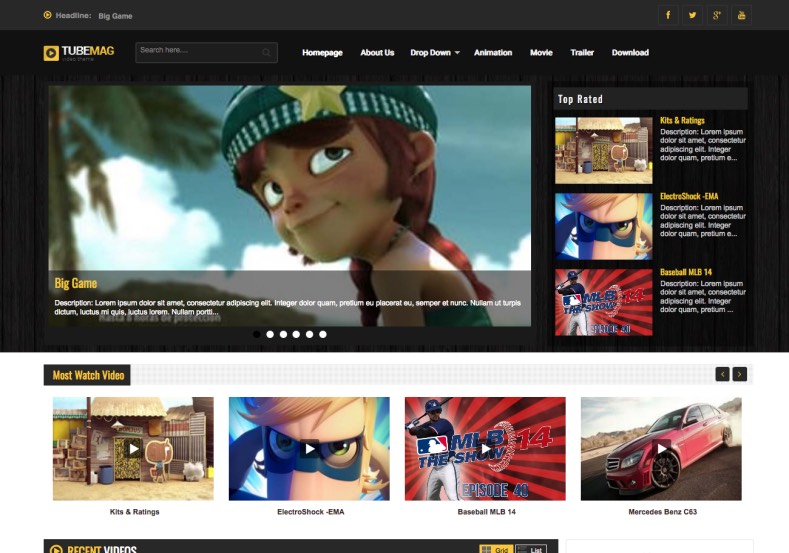

YouTube Style UIVideo Embed ReadyTube MagazineAdSense Ready
Turn Your Blog into a High-Performance Video Tube Portal with Tube Mag
Designed for online video creators, vloggers, gaming channels, and viral media aggregators, Tube Mag is an agile video magazine Blogger template modeled after premier streaming directories and YouTube. Built from the ground up to showcase video content dynamically, it features thumbnail play badges, automated video embed resizing, and viewer-friendly dark accenting. You can download the complete template package through our Direct Download Link to inspect the clean XML source code.
Built for Video Curation, Playlists, and High Viewership
Tube Mag takes the complexity out of video publishing on Blogspot. Its automated layout handles YouTube, Vimeo, Twitch, and HTML5 embeds seamlessly while placing persistent channel subscription buttons and social share bars right under the player.
Core Features & Architecture
- Dynamic Video Play Overlays: Automatically adds crisp play button badges over post thumbnails to maximize click-through rates.
- Fluid 16:9 Responsive Embeds: Ensures embedded video players adapt cleanly across smartphones, tablets, and desktop browsers without horizontal overflow. You can test the Fast Mirror Source to review theme demo setups.
- High-CTR Video Ad Placements: Pre-built ad slots positioned above the video player, below the clip description, and in the right sidebar.
- VideoObject Schema Structured Data: Enhances Google search engine discovery by formatting publication timestamps, video runtimes, and thumbnails.
- Lightweight & Fast-Loading Code: Minified CSS and asynchronous script loading guarantee rapid first-page paint times on cellular 4G networks.
Technical Specifications
Installation & Setup Guide
- Use the Download Official Package link to download the
Tube-mag-Blogger-template-Free-Version.ziparchive. - Extract the contents on your local storage to access the core
.xmltemplate file. - Log into your Blogger Dashboard, navigate to Theme, and select Restore from the menu.
- Upload the extracted XML document to implement the video tube design immediately.
- Head to the Layout tab to configure your YouTube subscription button, video categories, and AdSense codes.


