

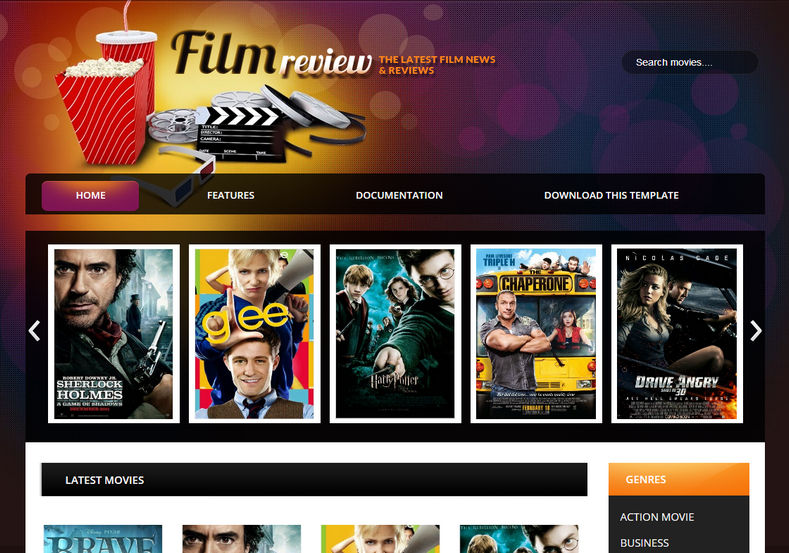

Create an Immersive Cinema & Movie Critique Portal with Film Reviews
Tailor-made for film enthusiasts, entertainment columnists, and movie critics, Film Reviews is a dark, theatre-inspired Blogger template crafted specifically for the cinema ecosystem. Whether you are covering theatrical box-office releases, publishing actor and director spotlights, reviewing streaming television series, or embedding official HD movie trailers, Film Reviews provides the dramatic presentation your audience expects. Access the complete theme package through our Direct Download Link to inspect the clean XML structure.
Built for Cinephiles, Box Office News, and Production Stills
The template is optimized to display rich media: widescreen cinema posters, high-resolution production stills, cast rosters, and embedded YouTube/Vimeo video trailers with zero layout distortion on mobile viewports.
Core Features & Architecture
- Dark-Room Theater Aesthetic: High-contrast dark backgrounds highlight bright movie posters, stills, and video thumbnails for an authentic streaming vibe.
- Movie Review & Rating Scorecard: Structured display blocks to showcase star ratings, IMDb/Rotten Tomatoes critique summaries, and pros/cons verdict lists. You can check the Fast Mirror Source for layout previews.
- Responsive Trailer Embeds: Built-in video wrappers ensure embedded movie trailers and actor interviews scale perfectly across phones and tablets.
- Entertainment Ad Placements: Pre-built leaderboards and in-article banner spots optimized for movie affiliate links and Google AdSense revenue.
- Cast & Crew Information Boxes: Structured sidebar and in-feed widgets to highlight actor filmographies, release dates, and theater showtimes.
Technical Specifications
Installation & Setup Guide
- Use the Download Official Package link to download the
Film-Reviews.ziparchive. - Extract the contents on your device to access the core
.xmltheme file. - Log into your Blogger Dashboard, navigate to Theme, and select Restore from the menu.
- Upload the extracted XML document to apply the cinematic design immediately.
- Head to the Layout tab to customize movie category tabs, trailer widgets, and banner ads.


