

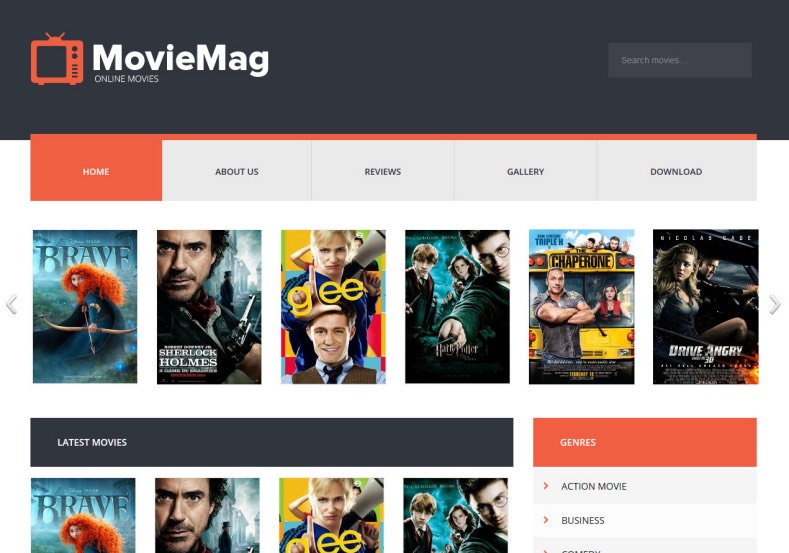

Broadcast Trailers & Film Reviews with Movie Mag Video Blogger Template
Designed for entertainment journalists, film reviewers, and video publishers, Movie Mag combines the depth of an editorial magazine with the visual power of an online video tube. Whether you are running a cinema gossip portal, curating official Hollywood & regional trailers, or publishing television episodic breakdowns, Movie Mag ensures your video content and written stories captivate audiences on every screen. You can grab the complete setup archive via our Direct Download Link to inspect the clean XML source code.
Hybrid Media Magazine Layout with 16:9 Responsive Video Cards
Movie Mag bridges the gap between text-heavy reviews and high-bandwidth video playback. Its automated card system features video duration badges, play icon indicators, and smooth lightbox trailer popups without overloading mobile browsers.
Core Features & Architecture
- Hybrid Video & Magazine Layout: Displays featured trailer spotlights alongside organized editorial columns for film critique and box office reports.
- Fluid 16:9 Video Embed Player: Responsive player wrappers supporting YouTube, Vimeo, Dailymotion, and MP4 embeds. You can test the Fast Mirror Source to review theme demo setups.
- High-CTR Monetization Containers: Dedicated banner slots positioned above video players, below critique summaries, and inside right-sidebars for Google AdSense.
- VideoObject & Article Schema: Built-in structured microdata ensuring movie reviews and trailer embeds index swiftly in Google search snippets.
- Mobile-Optimized Off-Canvas Navigation: Smooth sliding mobile menu that keeps movie category lists accessible on handheld devices.
Technical Specifications
Installation & Setup Guide
- Use the Download Official Package link to download the
Movie-Mag-Free-Version.ziparchive. - Extract the contents on your device to access the clean
.xmltemplate file. - Log into your Blogger Dashboard, navigate to Theme, and select Restore from the menu.
- Upload the extracted XML document to apply the Movie Mag video design immediately.
- Head to the Layout tab to customize movie genre categories, video embed modules, and AdSense codes.


