

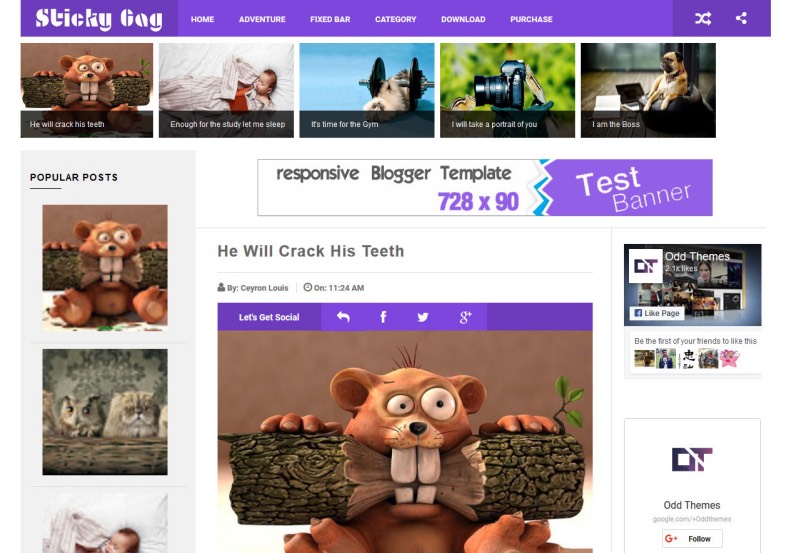

Viral / 9GAG StyleSticky SidebarMedia CurationZero Lag
Build High-Engagement Meme & Entertainment Portals with Sticky Gag Blue
Sticky Gag Blue is a purpose-built entertainment and viral meme Blogger template heavily influenced by the visual dynamics of premier curation portals like 9GAG. Engineered for viral engagement, it prioritizes fast-loading vertical media feeds, instant social sharing, and sticky widget architecture that keeps your monetized banners always in view. Grab the complete bundle through our Direct Download Link to review the XML theme files and assets.
Why Sticky Gag Excels for Viral Communities
With dedicated vertical media feeds for animated GIFs, memes, infographics, and embedded YouTube/Vimeo shorts, the theme retains visitors seamlessly. The sticky floating navigation ensures continuous exploration without cumbersome pagination friction.
Core Features & Architecture
- Smart Floating Sticky Sidebar: Keeps primary ad units and trending viral posts permanently visible while users scroll through long meme feeds.
- Optimized Viral Layout: Seamless support for high-resolution images, meme captions, and responsive video embeds. You can verify the Fast Mirror Source for sample configuration files.
- Instant Social Sharing Bar: One-click distribution buttons for Facebook, Twitter (X), WhatsApp, and Pinterest positioned right below each post.
- High-CTR Monetization Ready: Strategically integrated in-feed banner positions, header ad slots, and floating skyscraper zones built for Google AdSense.
- Lightweight & Ultra-Fast Codebase: Minified CSS and asynchronous script handling ensure seamless responsiveness across 4G and budget Android devices.
Technical Information
Installation Walkthrough
- Click the Download Official Package link to download the template archive.
- Extract
Stickygag-Blue.zipon your system to access the.xmltemplate file. - Go to your Blogger Dashboard > Theme > click the three dots next to Customize > select Restore.
- Upload the extracted XML file to apply the new design instantly.
- Head to the Layout tab to configure your social handles, logo, and sticky ad placements.


